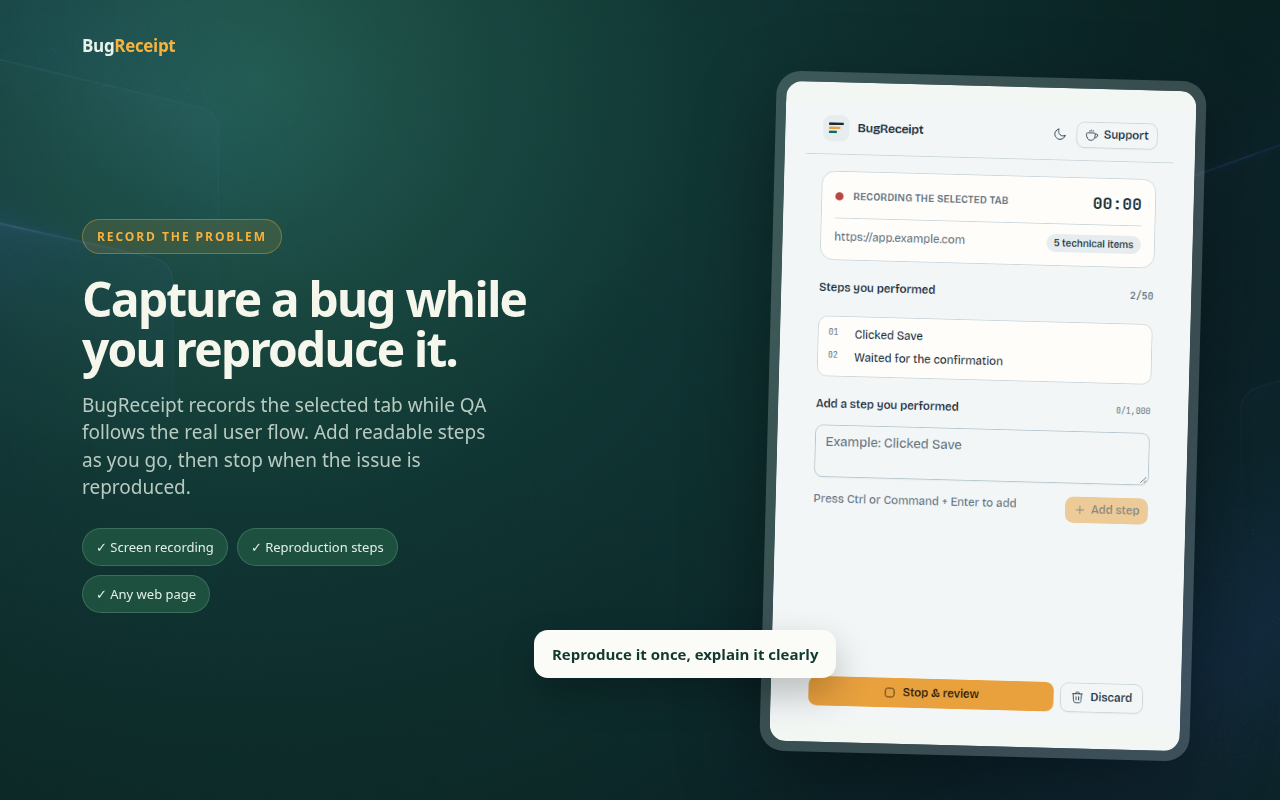
Turn broken into reproducible.

BugReceipt records what matters—one browser tab, console errors, network activity, and your manual QA steps—so you can review everything locally and export when you’re ready.

Download BugReceipt for ChromePrivate by design · No accounts · No cloud
BugReceipt v0.1.5

Record the failure.Keep the evidence.

  1. 01 Steps
  2. 02 Console
  3. 03 Network
  4. 04 Screen

BugReceipt captures only what happens after you start. Review everything before export.

Choose tab & startChrome asks which tab to record. No account, microphone, tab audio, or upload.
  1. 00:00Record

    You start recording on a browser tab.

  2. 00:08Console

    Errors and warnings are captured.

  3. 00:12Network

    Requests, responses, status, and timing.

  4. 00:18Review

    Inspect the trace, filter noise, add steps.

  5. 00:24Export

    Choose the local files that leave.

Illustrative example · sample checkout failure

Evidence trace

00:00Record
BugReceipt extension workflow showing tab capture, recording status, review, selected-frame annotation, diagnostics, and report export
Extension workflow · Live preview
URL
app.example.com/checkout
Started
09:41:02 AM
00:08Console
12:41:08.512 × TypeError: Cannot read properties of undefined at onSubmit12:41:08.915 △ Warning: Synchronous XHR on the main thread is deprecated.
3 errors · 2 warnings
00:12Network
POST/api/payments500
GET/api/cart200
GET/api/user200
18 requests · 2 failed
00:18Review
  • Reproduced on Chrome
  • Logged in as test user
  • Added item to cart
  • Clicked “Pay now”
  • Payment failed with 500
5 manual steps · Notes attached
00:24Export
bugreceipt-report/  ├─ issue.md  ├─ recording.webm  └─ selected-frame.png
All files stay on your device

Local until you choose to share.

Everything stays on your device

No upload. No cloud. No third-party servers.

Captures only after you start

Before you click record, nothing is collected.

You control what gets exported

Review, filter, annotate, and remove before export.

Export is always your choice

Send it to a team, or keep it for later.

Every signal remains inspectable.

The trace is not a black box. BugReceipt keeps each evidence type visible in the review so a tester can remove noise, capture a frame, annotate the problem, and verify the report before it leaves the browser.

BugReceipt extension workflow showing tab capture, recording status, review, selected-frame annotation, diagnostics, and report export
Extension workflow · Live preview
  1. 01
    Screen recordingSelected tab only

    No microphone, tab audio, or unrelated windows.

  2. 02
    Console timelineErrors first

    Logs, warnings, exceptions, and rejected promises.

  3. 03
    Network activityFiltered locally

    Fetch, XHR, and page requests with sensitive details removed.

  4. 04
    Reproduction contextTester supplied

    Steps, page URL, browser version, and behavior notes.

From ZIP to a persistent side panel.

The current pre-release is distributed through GitHub as an unpacked Chrome extension. Keep the extracted folder in place after installation.

Download BugReceiptBugReceipt-v0.1.5-chrome-unpacked.zip
  1. 01

    Download and extract

    Download the Chrome ZIP and extract it to a folder you will keep.

  2. 02

    Load unpacked

    Open chrome://extensions, enable Developer mode, choose Load unpacked, and select the folder containing manifest.json.

  3. 03

    Pin and capture

    Pin BugReceipt, open the affected page, and keep the side panel visible while you reproduce the issue.

Know the boundary before you install.

What does BugReceipt capture?+

Only activity collected after you start: the selected tab’s video, console messages, network activity, page details, and any steps you add manually.

Does a recording upload automatically?+

No. The capture stays in extension-owned browser storage. Downloading creates a local report bundle; email delivery happens only after you explicitly choose it.

Why do I need Chrome Developer mode?+

This is a pre-release package distributed through GitHub Releases. Chrome requires Developer mode to load an unpacked extension that is not yet in the Chrome Web Store.

Can I remove sensitive evidence before export?+

Yes. Review the recording, selected frames, console entries, network entries, steps, and behavior descriptions before downloading or sharing the report.

Capture the failure while the trace is still intact.

Reproduce once. Hand off the screen, browser signals, and steps as one local report.

Download BugReceipt for Chrome